Sure, with all the AI tools we’ve become more productive (or so they say), but there are some old and battle tested techniques that will help you if you’ve ever ended a workday thinking "I was busy all day… but what did I actually do?".
In this blog post I’ll summarize the simple productivity systems that kept me sane as a dev:
- writing stuff down on paper (yes, really)
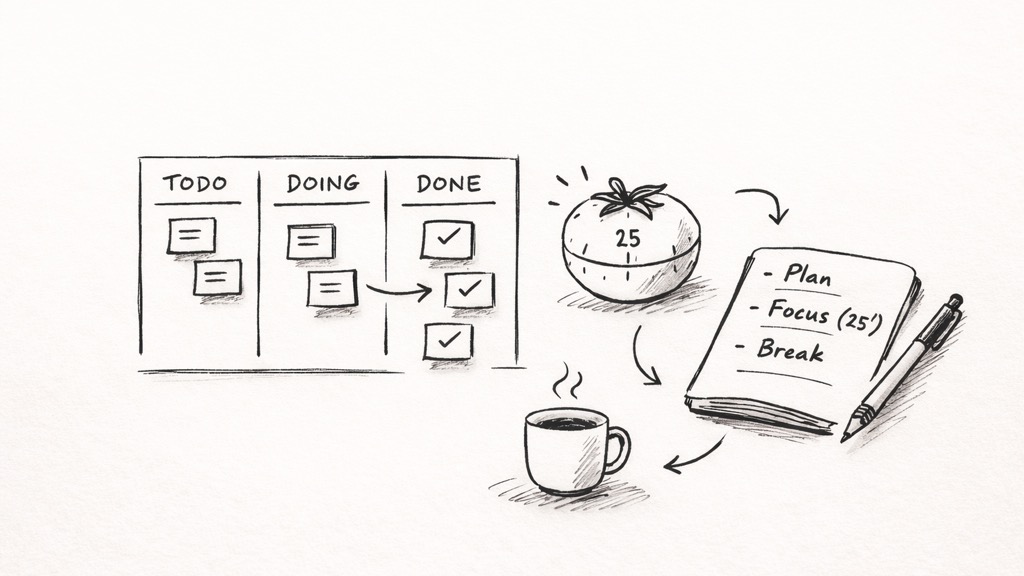
- keeping a limited "Doing" list (Kanban)
- working in short focused sprints (Pomodoro)
- tracking where time actually goes (RescueTime),
- building habits with discipline instead of waiting for "motivation"
🎧 If you fancy an audio version, feel free to listen to this DevThink episode: https://devth.ink/e002_productivity/.
TL;DR
- Pen + paper still wins for planning, because it’s fast, flexible, and doesn’t require yet another app
- Personal Kanban works because it forces you to limit WIP (work in progress) and gives you a visible "Done" list
- Pomodoro is stupid-simple… which is exactly why it works. Do a real one (no email, no Slack, no calls during those 25 minutes), then do eight in a day and see your productivity skyrocket
- Tracking (even lightly) is a clear way of knowing "where did my day go?". Use a free app like RescueTime to learn exactly where your time went
- Habits > inspiration. Show up, do the work, repeat.
!TL;DR
Why paper beats "yet another productivity app"
In the podcast, Shawn and I tried digital systems. Both of us still come back to paper for day planning.
Not because apps are bad, but because:
- we already spend our whole day typing,
- paper is offline and distraction-free,
- and a notebook can be a calendar, journal, TODO list, idea dump… whatever you need today
Shawn also explains the Bullet Journal approach (start with a blank notebook + table of contents and make it yours), while I share the more structured BestSelf "Self Journal" format (3-month goals, daily prompts, gratitude, wins, lessons learned, etc.).
Personal Kanban (and the magic of limiting "Doing")
If you only take one thing away, take this:
Your "Doing" list must be limited.
Kanban’s superpower is that you can’t keep dumping work into the "Doing" column. You move something to "Done" first. That’s how you stop feeling like you’re doing 20 things and finishing zero.
Bonus: at the end of the week, the "Done" column is a reality check that you did get work done — even if it didn’t feel like it.
The tool I use for this is a free app called KanbanFlow.
Index cards
Shawn shared one technique that works surprisingly well for him:
- grab index cards,
- write one task per card,
- clip them together.
Now you can physically sort and prioritize your tasks on your desk like a tiny human Kanban board.
Getting Things Done (GTD)
We touch on Getting Things Done system by David Allen and the big psychological idea behind it:
- If your brain thinks you’ll forget something, it keeps reminding you
- That’s why you’re thinking about work at 2AM
- A single trusted place to capture tasks calms that down
Even a simple list + calendar can reduce that background anxiety.
"When in doubt, throw it out"
I bring up a tip from Brian Tracy (and we drift into minimalism for a moment):
If something has been sitting on your list/bookmarks/todo pile for six months, there’s a decent chance you’ll never do it.
Keeping "aspirational" tasks around can become emotional debt. Sometimes the most productive thing you can do is delete the thing and move on.
Pomodoro: the simplest focus tool that still punches above its weight
Pomodoro is basically:
- work for 25 minutes (no distractions),
- break for 5,
- repeat,
- after 4 cycles, take a longer break of 30 minutes
And the key rule: if you break focus (check email, respond to a Slack message, answer the call), that Pomodoro doesn’t count.
My favorite challenge from the episode:
Try to complete 8 real Pomodoros in a day.
Do that for a month, and after it feel free to thank me for this newfound productivity.
Tracking your time
Shawn shares a neat approach: a script that pops up every so often and forces you to write what you’re doing.
I share my "overly detailed" habit of logging work in Evernote (nowadays I use simple Google doc), and why something like Shawn’s approach can be even better — especially for long debugging sessions where progress is slow but the work is real.
We also talk about RescueTime (a tool that tracks app/site usage) and the very honest moment when it tells you you spent 10 hours on Facebook. Ouch.
Sharpening your axe (aka: learning counts as work)
This is a topic we both care about:
If you’re spending extra time outside work, don’t just do more of the same work.
Use that energy to improve — learn, explore, build side projects, read, sharpen your skills.
That helps you and your team long-term.
Habits: do a 30-day challenge, don’t wait for motivation
We wrap up with something I love:
- do it for 30 days,
- make it small (even one Pomodoro),
- and let it become a routine.
And the quote that basically sums up the whole episode:
Inspiration is for amateurs. Pros show up and do the work.
Full transcript
Below is the full transcript, in case you wanna throw it into an LLM or something 🙂
Shawn: Alright. Hello. And welcome back to the DevThink podcast with Shawn and Nikola. Today, we are here
to talk about some organizational and time management techniques that have helped us as developers
to get through the week without feeling like we’ve done absolutely nothing.
Nikola: Exactly. Welcome, guys.
Shawn: Yeah. So I think we’ll start. We’ll talk a bit about the paper version of things such as the the
Bullet Journal, Self Journal. And actually, Nikola, I think you and I have probably both
experimented. We haven’t talked about this prior to the podcast, but we’ve probably experimented
with online or web based systems, and we have both, separately decided on using an actual pen and
paper method. Is there anything you, wanna say about the online versions, why they didn’t work out
for you?
Nikola: Okay. So actually, actually, here’s the thing. The online versions, I still use one till this day.
It’s called, kanbanflow.com. So, so no affiliation as with, like, probably everything.
kanbanflow.com. It’s kinda like a Kanban board, but the only reason why I still kinda use it is that
it has an integrated Pomodoro timer, which we’ll say more about during this show. And that’s why I
kinda, like, still use it for the tasks where I time them. But, yes, to answer the question why I
still use my pen and paper for planning out my day is, I guess that maybe the reason is because I
type so much. I mean, we both type like 90% of our time is that I still like to have a pen, have a
paper, write something in it because know, it’s kinda like becoming a lost lost art kind of. How
how’s the reason with you? And I’ll I’ll to add to this, this is something that I’ve been doing, you
know, those kinda like to do lists ever since I can remember, you know, like, I would say, you know,
in your version, like middle school, you know? And I love it since.
Shawn: Yeah. I like the the pen and paper tactile feedback. It’s something that you can do offline. And I
feel like at the end of the day, I also the thing is it’s very versatile. Right? So my notebook is a
journal and a to do list and a calendar and, you know, whatever you want it to be. It can be your
your food journal. It can be your weight loss guide. It can be, you know, your appointment book. And
just taking that with a pen and paper, with a computer screen off, and just doing things at the end
of the day, I think is very helpful. And since you did mention Kanban, and we didn’t really explain
it, you can just look up Kanban online. It’s a very simple concept that comes from the manufacturing
philosophies from Japan. And the short version is, instead of having a single to do list, you have
at least you divide the list into maybe three columns. The first column is the stuff to do. The
second would be doing, and the third would be done. And the very important thing, the magic bullet
here in Kanban is that doing box is limited. You can only have a set number of things. Maybe it’s
two. Maybe it’s three. Maybe if you have a developer team of 20 people, maybe it’s five. But nothing
is allowed to be put into into the doing column until something else is moved out into the done
column. And that’s the basic short version of it. You can make it a lot more complicated, have a for
example, in software, you can have a QA column. It can go from the doing to the QA column or
whatever. And it’s also important to have the done column because at the end of the week or the end
of the month, if you do this, my wife has one on the wall, it’s just overwhelming. You have a never
ending task list of things to do. You always feel like you were super busy all day, all week, and
you’ve done nothing. And you can look back at that done column, and you can actually see, yes, you
have done quite a bit. And you only clear them off when you have to, when you need room. So I just
wanted to mention that, because Kanban is a really great just you could do it for yourself. If your
company doesn’t buy into it, if your team doesn’t buy into it, you know, just do it yourself. You
can use that. You can use Trello, trello,.com, which is a nice simple Kanban flow as well. And,
yeah, give it a try.
Nikola: Yeah. There’s actually so we’re gonna probably leave the link in the description because I can’t
remember, you know, the actual name of the book. I think it’s personal Kanban or something like
that. I didn’t read it whole. I’ve lit I know, kinda like listed through it. I read few chapters. It
was good, but basically, as you said it, that’s the gist of it. So yeah.
Shawn: Yeah. Kanban is is really helpful. So I guess I’ll just briefly mention the Bullet Journal. I’m
actually not a an expert on the Bullet Journal. I do use, I guess, a modified version of it, which I
guess pretty much everyone who uses the Bullet Journal does. It’s just bulletjournal.com. You can
use any notebook you want. And you have, you know, a table of contents. That’s very important in the
beginning. And then depending on how strictly you follow it or how you adapt it, you have a section
for your calendar, for goals for like a week or a month. Then you have, like, a weekly spread, which
I actually don’t do. And another thing I don’t do that many do is they decorate their Kanbanes. They
use washi paper. They use all kinds of different color markers to make everything pretty. But, Just
go check it out. They’re a bunch of YouTube videos, and I don’t really want to go into detail
describing it because there are a thousand ways to do it, and you just have to make it your own. And
that’s the thing I like about it. You can just make it your own. The important thing to me is having
the table of contents. And also, you start with a blank notebook. Any blank notebook. It could be a
molyscheme. Could be they sell one. Page three things. You need page numbers. You need a blank
notebook with a table of contents. And then everything you do, you write on the next available page.
It’s not like a premade book where, okay, if I wanna put a journal entry, I have to turn to page 47
because that’s where the journal section starts. Or if I wanna write something on my, you know,
calendar for the week, I have to flip over to the this week in the calendar. That’s what the table
of contents is for. If one page has a recipe and the next page has a journal entry and the next page
has your spread from Monday through Friday for next week, that’s totally fine. That’s why you have
the table of contents. You don’t you don’t waste pages, and you can start it any day. You could
start it March 27, and you’re good to go.
Nikola: Cool. Okay. Sounds nice. And sounds like way more flexible than the one that I use. The one that I
use is, called Self Journal. I honestly don’t know the exact website, you know, I bet that if you
just Google Self Journal, you know, it will pop up. Actually oh, I see it’s, bestself.co. So
bestself.co. Here’s the thing. This one is kinda like specific in terms of its three months, of
trying to, let’s say, reach a certain goal. But, also, you can start it any day that you like.
Although, to be honest, it’s very it would be way better if you it’s actually kinda, like, set that
way that it kinda, like, makes you start on Monday because, you know, it has week note notes in it.
And how it actually works is you have your kinda, like, from 6AM to 9PM time schedule that you can
put in, then it has your kinda like notes, ideas. And something that’s kind of very important here
is that you also have few questions. And this is so you have a question, for example, this morning,
I’m grateful for, and you have to list three things. I’m not going to go into the details and and,
I’m not going to breach into the so called woo-woo kind of, you know, new age, quote, unquote, BS.
But, honestly, you know, like, just try it, and you’ll see if this helps you in any way. Also, have,
on every kinda like a day page, you have to write your own goal. What your goal is? Well, your goal
is that thing which you kinda like set that you’re gonna achieve in this try three months. Right?
Why it’s important to write it every day? Well, because, you know, if you keep it in your
subconscious, then also going into that woo-woo BS, it will you will constantly have your mind on
this, you know, goal that you wanna achieve. And then below it, you have your today’s targets, which
you kinda like list three targets or whatever amount of targets if you’re now very high achiever.
You list your targets for this date that will help you come next to that end goal that you wanna
achieve. Then you have few, you know, quotes, which is kinda nice. Actually, I’m gonna read you the
one from today. Know what you want, work to get it, then value it once you have it. It was by Nora
Roberts. Then in the evening, that’s also important. So, basically, you kinda like use it the whole
day. And in the evening, you list the lessons learned, wins, even, you know, like, even the small
ones, you know, I took out the trash. It’s important to as you basically going back to what you said
looking at the end of the week it’s very important to also see what you did and not just always look
at the stuff that you always have things to do because honestly if you’re let’s say, an achiever and
you you are a go getter, then you will always, always, always have stuff that you, you know, have to
do or want to do. And also, like, finally, you have the tonight I am grateful for, where you also
list three things that you’re grateful for. And they also have this thing kind of like, how you
called it, week recaps, where you write, how your week went and stuff like that like like that. To
this, I kinda like added one more thing to this where I do one thing from the book called the
miracle morning. I don’t know. You probably haven’t mentioned this before, but I did I believe I
mentioned this book to you. And, you know, I’m not sure, but you’ll tell me you kinda like didn’t
like it, but I like it. And what I take from it is the so called SABRS. So SABRS is an acronym for,
silence, affirmation, visualization, exercise, read, and scribe. And to not go too deep into it,
like, s is for silence, and honestly, I’m not very good about it. I only do one minute of quote
unquote meditation. I know everybody is someone who’s doing the meditation will laugh, but, you
know, gotta start somewhere. A is for affirmations. Again, breaching into the, you know, Google
stuff. I have my list of affirmations that I read to myself. Am I crazy or not? Let’s just not go
into it. I think that it may help you, you know, but I’m gonna keep this one for myself. V is for
visualization. So you have your goal. Right? And if you try to visualize yourself I’m not gonna go,
you know, run the burn on people and say, you know, you just have to visualize it and what it will
manifest. No. Not none of those none of that kinda, like, bullshit. Oh, I don’t know if we’re
supposed to say bullshit here, but, you know, I guess we can do whatever we want because it’s our
podcast. And, to be honest, you know, you have to work in the end, you have to work on it. And
that’s just, you know, we we are both wired on it. We are gonna, I guess, speak more about it and
how we do stuff, but not to try to drag this one way longer. The e is for exercise. I honestly do
just you know, if I can, go for a walk for, ten minutes in the morning and listen to my Audible,
which I love, by the way. R is for read. I try to read every morning, at least ten minutes of
something, you know, I try to make it positive and whatnot, because during the day, I read all the
stuff that I read is concerned, with software development. So this in the morning kind of stuff,
it’s something that’s not related to software development, but, you know, may maybe a book, you
know, whatever. And then finally, describe part is where I reflect on my day before. So, literally,
I have my action. So for this, I have my other book because so this one this Self Journal is just,
you know, as I said, for three months, and I have my totally blank, very big a four kinda big,
journal where I write things that happened for the next past day. Why? Because, well, I want to have
it as I want to put as much stuff in it because then it’s very, very I found it to be very rewarding
to go back and reread the stuff that I wrote, let’s say, two year I actually have entries that go
way back like two years ago. And that’s kind of very rewarding to go back and read what you were
thinking at that time, what were your struggles at the time, …. Anyway, not to, you know, prolong
this answer too much, but yeah, I’m currently I’m sticking with this self, best self Self Journal.
Shawn: Right. So, and just to clarify it, I, I didn’t like the book, not because I had a problem with the
message, but because the entire book came across as a giant infomercial for itself. So it was
whatever. A couple hundred, three hundred pages, whatever. And from the amount that I read, it seems
like it could be about 10% of its length and just tell you what it wants to tell you, instead of
every other paragraph telling you how great what they’re telling you is going to be for you, and how
exciting and awesome it It’s like there’s a hard sell in the book you’re already reading. So that
frustrated me. And then to finish off the paper thing, there’s also a fun little thing called I’ve
seen it referred to as the hipster PDA. And all that is is you get a stack of index cards and a
binder clip that you may have seen as one of those typical, you know, black triangle things. And you
just put them in the clip. That’s it. That’s the entire thing. And then on each one, you can write a
task. And what’s really cool about that is when you sit down at your desk, you just came back from
lunch or you just came back to work after on on Monday after the weekend off or whatever. You came
back from a meeting. You’re completely out of the zone. You have no idea what you should be spending
your time on. Boom. You take out your index cards. You look at them. They’re physical items you can
move around, put on your desk, reorder, you know, make notes on. And it’s really nice because then
you can look at that and say, okay. This is the one I should probably be spending my time on now.
And I really enjoy doing that. As a matter of fact, I started doing that again recently. I didn’t
have any index cards with me, I did have a deck of cards, of actual playing cards. And so I took a
marker, and I wrote on the cards, like, on the borders, on the edge, just tasks. And I was able to
sit down multiple times throughout the last couple weeks, pull them out, reorder them, prioritize
them, group them by ones that I’m gonna do in the near future, ones that I should be doing today,
ones that I would still like to do, but they’re just not gonna be anytime, anytime soon. And that
helps you schedule things on your calendar. Maybe I know I don’t have time for this now, but I’ll
schedule it every Tuesday at 10:30AM and leave it there until it’s done, which is actually,
something that I just did last week. I filled up my calendar with a bunch of things from my cards,
and I schedule them as recurring to happen every single week. And I know they’re not gonna get done
every time, but they can stay on there until they’re done or I decide they’re no longer necessary.
And that is a good way. All of these things, by the way, psychologically, there’s a book called
Getting Things Done by David Allen, which I recommend everyone at least take a look at and skim. I’m
sure actually, probably everyone listening to this has probably read it or heard about it. The
general idea is that you are not allowed to have many sources of to do lists. You can’t have
everything in your email inbox, plus a bunch of post notes on your fridge, plus, you know,
handwritten notes in your pocket, plus voice mail messages. You need to put every single thing that
comes into your life into one place, whether it’s an electronic system or paper, doesn’t matter, but
only in one place. And then it gets processed. It gets put onto a you do you do it if it’s less than
two minutes. You delegate it if you can’t if you if you can delegate it, or you schedule it, put it
on your calendar or something. And the general idea is that if you have anxiety because you have too
many things that you know you need to do and you know you haven’t been doing them, your mind,
because it’s uneasy with that, is going to keep bringing them into your into your thoughts. And
that’s why you can’t fall asleep at night. Because you’re laying there, and you can’t fall asleep
because you’re thinking about the 50 things you didn’t do. If you take those 50 things, write them
down, put them on a calendar, say, okay. I’ll do this one next Tuesday. I’ll do this one tomorrow
night at, you know, 08:00. I’ll do this one noon. Once your brain knows they are handled, even
though you’ve done nothing but schedule them, your brain knows when your calendar alert comes up,
it’s gonna be you’re gonna be reminded at the right time. It’s not gonna slip away, and you’re not
gonna suddenly, you know, show up at the airport without having bought your tickets or whatever.
You’re able to sleep. So, yeah, that’s just you know, I wanted to mention GTD, so that’s all I have
to say about that for the moment. Anything else on calendars and paper and pen, or should we move on
to some of the day to day techniques?
Nikola: Actually, yeah, I remembered one thing now as you were saying about GTD. And if you like, this is a
very good tip from Brian Tracy. I’m gonna mention his I quote, unquote read why I said, quote,
unquote, because I listened to, the audible version of the time management made simple by Brian
Tracy. And that’s kinda like a book, where he has all the stuff that he kinda like wrote about time
management condensed into one, let’s say, book. And it’s very good. Like, this is the book, that I
reread or re listened most amount of time. Because here’s the thing, I believe that we need, you
know, to hear these things over and over again just because, you know, if you heard it one time and
you think it’s great, but then you try it and maybe you kinda, like, forget it, it’s good to be
reminded about it. And one thing that just, you reminded me of is so you have your stack of, you
know, tasks or whatever, or you as you said, you file stuff in. And then if after six months, you go
in and you revisit that list, and if for example some, you know, or maybe this is okay, this is an
awesome, example. I have bookmarks. Right? I have so many bookmarks that I need to kind of like
look, But then again, if you see that some bookmarks or some files that you need to kinda like look
into or read through are still there after six months, probably you should just toss it away. He has
this cool thing. When in doubt, throw it out. And it’s actually honestly true because if you’re if
you haven’t looked at it in six months, probably, you know, it’s not worth your time.
Shawn: You know, that’s not only true for I don’t wanna take the podcast on a whole left turn, but real
quick note about minimalism, which you’ve been to my house. I am not a minimalist by any stretch.
But I have acquired multiple books on minimalism, which is ironic. And one of them is called The Joy
of Less. And the author says that you should only have things in your home if you either believe
them to be useful or sorry, know them to be useful or believe them to be beautiful. And know them to
be useful. It means you have to use them. If you have some, you know, implement in your kitchen and
you never use it, I mean, probably three or six months is a good amount of time. You should get rid
of it and believe it to be beautiful means you not only like it, but you have to have it on display.
So if you have, like, an old thing that your grandmother left you that, you know, some dishware or a
a picture that a painting, if you don’t have it hanging up for everyone to see, it needs to go. So
you decide. Do you really need it in your life? Do you really need to pay money to store it, to
climate control it, to clean it, to even just the space it’s taking away from you being able to move
around in your home and be comfortable and spend time with the things and people that you want to
spend time with. Is it really worth all the overhead? And the answer is no. And the same thing with
all these aspirational things we buy. How many people listening right now have a guitar or some
other musical instrument that they bought to learn, and it’s been sitting untouched for more than a
year? I know I just struck a chord with a lot of people. Or, you know, a juggling set or a set of
skis, or you know
Nikola: Set of exercise equipment.
Shawn: These are these are called aspirational items. Like, and I’ll tie us back into our our actual
podcast topic in a second. These are what’s called aspirational items. Every time you look at it,
you say, if I get rid of that guitar, then I will not end up ever end up being a guitar player, and
I want to be a guitar player. I see myself as someone who I would like to be a guitar player. And by
getting rid of this, by selling it, put it on Craigslist, not only am I giving up on that dream, but
I’m also now officially a failure. As long as I keep it, I might get to it one day. But if I get rid
of it, I’m admitting to myself and the world that I’m not capable or I’m not good enough or
whatever. And that’s just not true. That’s just a mental block that you’d have to get to. And so, to
bring it back around in a circle to us, as a developer, we all have ideas for side projects and
businesses we wanna start, and features we wanna add to our company’s product that are gonna get us
recognition and make our coworkers love us or some process that we wanna automate. And we have so
many of these ideas to the point that it becomes crippling when you look at the list because you
realize you haven’t done it, you don’t have time for it, and you’re probably never going to do it.
So now you feel like a loser just because you were actually trying to improve the world. You know,
you came up with these ideas. You’re like, wow. That would be great. That would be great. That would
be great. And then every time you look at it, it’s another reminder that you didn’t do it yet. And I
think you gotta throw the stuff away after a while. You know? I mean, I know you wanna contribute to
that open source project. I know you want to completely, replace this the, proprietary software at
work that you hate because, you know, it’s written in Java and you hate Java, or because, you know,
you hate the configuration tool, or you would just love to rewrite and make. You know, we all have
those things. You know, I wanna rewrite my own calendar system because I don’t like Google Calendar
or whatever. You know, you’re not going to. And even if you did, it’s not worth your time other than
as a learning experiment. And for the amount of time it would take to do well, you might as well
pick one of your other side projects. So yeah.
Nikola: Awesome. This this was great. This was great. Just like a quick question. Did you read the book? I
can I don’t know the exact name? I mean, the title, the magic of tidying up or something like that.
Shawn: I don’t know.
Nikola: Yeah. Because it was very similar to what you were saying to the other one.
Shawn: Anyways, cool. Called Swedish death cleaning. You should just Google that real quick. Swedish death
cleaning. Apparently, it’s a tradition in Sweden that as you approach a certain age, from like maybe
50 or so, that you start getting rid of things over time, so that when you die, your family doesn’t
inherit a house full of stuff. Interesting. Yes. Alright. So we’ll go back, move on to the the next
topic here, which is Pomodoro. I’ll describe the Pomodoro Technique because it’s so easy to describe
briefly. The short version is, you set a timer for, let’s say, twenty five minutes. You work only on
one thing for that twenty five minutes. You take a five minute break, then you do another twenty
five minutes, another five minute break. And the very, very important rules are, once you start,
there are no distractions. If someone comes and interrupts you, they have ruined that cycle of the
Pomodoro. If you go to Facebook or your email, you have ruined that Pomodoro. You focus intensely
only on the one thing for twenty five minutes. Take a break. Repeat. Once you’ve done three or four
of these, you can take a longer break, you know, ten, fifteen, twenty minute. And the twenty five
minutes, five minutes is entirely that’s, like, kind of the standard. But you can make it anything
you want. You can do ten minute Pomodoros. You can do one hour Pomodoros. Probably neither one of
those are those are probably both a little extreme. But, yeah, that’s basically it. And I’m gonna
assume that 80% of the people listening to this already know the Pomodoro Technique and have used
it. And, Nikola and I both really like it. So I’m sure you have some stuff to add to that.
Nikola: Yeah. Pomodoro rocks. I mean, actually, as I always say, right, here’s a challenge for you. I
challenge you to do eight true Pomodoros. You know, don’t don’t try to fake it. Yeah. I just
answered that email now. True Pomodoros, I challenge you to do eight of them in a working hour. Yes.
That’s if you calculate less than four actual hours. But, honestly, remind remember me when you do
that and when you look back on your day that day, you will feel like, oh, man, I really did a lot of
things today. Trust me. Try it. You’ll see.
Shawn: Yeah. And if you’re using the hipster PDA or if you’re using, you know, the Kanban method or
whatever, at the before each Pomodoro, look at it and say, where should I be spending my time?
Should I be working on the thing that I did right before my last break because I was getting on a
roll or because it really needs to get done because I have a deadline? Or should I look at, you
know, item two on my list, which I haven’t touched in five days that is coming up due as well? You
know, that’s all gonna be decisions you’re gonna have to make on the fly. But it’s really nice
because another well, nice for many reasons. One of the things that really helps me, and I’m sure
we’ve all done this, is you have some kind of problem. It’s not working out. You’re trying to write
some code or trying to fix something. Fix a bug. You can’t find the bug. Or you think you fixed the
bug. You deploy it to production and it’s still not working. If you take a step back and look at it
with bring someone over with fresh eyes or you stop working on it until tomorrow, which you can’t do
with a production bug, it helps a lot. If you put a limit okay. Here’s a twenty five minute limit.
I’m fixing this bug. For the five minutes, you should get up away from your desk at least, you know,
walk 10 feet away. Go to the bathroom. Get a hot drink. Do whatever it is you’re gonna do. When you
come back, you will probably realize a lot of the time that you’ve been going down a rabbit hole.
Like, you had a thought process. You had an idea, and then you kept iterating on that idea until you
were straying off from being productive because you think you’re almost there. Oh, let me oh, let me
just try it this way. Oh, let me just try this. And it turns out that wasn’t the right solution, but
you’re never gonna see that. You could have stayed at their desk for three hours with a full bladder
and a head full of stress and a headache just trying to beat this thing into submission. But if you
do a Pomodoro and get up and come back and sit back down, you look at it and you say, oh, wait. What
about this? Or try this. Or at the very least, I was clearly beating my head against the desk with
this. Let’s look for another approach.
Nikola: Yeah. Definitely. Agreed. Although to touch on one point, as you said, okay, let’s move to the item
number two. Here’s the thing. Yes, that’s a good point. Although I’m gonna link back to the Brian
Tracy again. I actually like that guy very much. He has this book called eat that frog, where he
basically says, if the first thing in the morning that you do is eat a frog, Well, probably during
the day, nothing worse will happen. Well, your frog is your task, you know, that it’s hard that you
can’t do. You’ve been at it for like maybe even, you know, a week, a month, whatever, and you just
can’t make the progress. No. Don’t go do anything else. Try to do force yourself to go and work on
this, task slash project first. Because, yeah, if that’s the worst thing that you do, probably you
won’t have anything worse during the day. Although, to give credit to your idea, yes, it’s maybe
sometimes good to, you know, just switch the thinking process to something else because you may get
another idea, back on the one that you couldn’t solve. But, yeah, just just be wary of, you know,
not pushing the main ticket or, I mean, ticket project to the sidelines.
Shawn: Yeah. And there’s there’s no right answer to this. It could be that eating the frog first is the
right answer for you 99% of the time. It might also not be. And just to take some learnings from
more artistic things like writing and music and create creative things or drawing. If the advice
that I’ve heard and read from multiple sources from authors and things like that is, if say you
write something, you don’t immediately critique it. You put it in a drawer for a day or a week, and
then you read it. And then you’ll find out if it was good or if it was crap. So you might just be
too close to it. You might need to take a break from it in order to take a have a clearer mind about
what the next step should be or whether it’s even worth continuing at all. So oh, and I should just
mention real quick, the pomodoro pomodoro is the Italian word for tomato, and it got its name from a
college student who was having trouble studying. And I forget his name, but if you look up Pomodoro
Technique, you’ll find the creator. And he had a kitchen timer shaped like a plastic tomato. And so
he named this the Pomodoro Technique. So there’s the mystery solved there.
Nikola: Yeah. Those who like apps, there are multiple versions of Pomodoro. Thousands.
Shawn: Chrome plugins, web browser pages that do it with JavaScript, Android, iOS. I mean, you can get
little standalone timers. I mean, a standalone kitchen timer that makes a loud ding at the end, you
know, might just be the thing for you.
Nikola: Yeah. Usually, you know, nowadays, especially it seems like we’re trying to, you know, complicate
things. This one is so simple. It’s almost as in, hey, this can’t work because it’s so simple. But,
yeah, most of the times, simple stuff, that’s what works. Right? Because, will you use a system that
you have to go through 15 steps of configuration or setting or what whatnot? Yeah. Maybe you will
two or three times, and then it’s back to the old habits. Right?
Shawn: Yeah. And so to move on to the next topic while also slightly hanging onto the Pomodoro, if you do
Pomodoros and you track them on paper or in whatever Pomodoro app you’re using, you have the ability
to go back at the end of the week and evaluate what you’ve done, sort of having a the version of the
done column in the Kanban board. And something that I have done, learned from a friend of mine,
Rupa, he wrote a bash script which would pop open his editor every, I think, every hour or something
like that. And he would just type in it when it pop when it popped up and interrupted him, he would
just type what he was working on. Then he can go back at the end of the week, and he can, you know,
see what he’s doing, how he’s spending his time. And I don’t know what his end goal with that was,
whether he was just trying to improve and see if he felt like he was wasting time, or he just wanted
to keep track of what he had worked on for the purposes of, you know, employee evaluations or
whatever. But I really like the idea, so I stole it. And I have, from time to time, actually made it
every fifteen minutes, sometimes half an hour. And it’s really good because when it pops up, and you
have to type what you’re doing, and you have to type, I was instant messaging with this guy, or I
was on Amazon researching a purchase I wanted to make, it snaps you back to, oh, yeah. I should
probably be doing something productive. And when you are being productive, a lot of times, you don’t
realize at the end of the day where your time went. It turns out, I was working on, you know, a
project, and someone had a problem and they asked me if I could look into it. And I’m digging into a
database, I’m doing some, you know, little bit of research where I’m answering a question, and my
little thing pops up, I’m like, oh, I helped so and so with this thing. Whereas if you would ask me
an hour later or especially at the end of the day or week, what I worked on that week, I would have
never realized it, but that person may have taken thirty, forty five minutes of my time. And it’s
good to keep track of that for your own sanity when you look back at how little you’ve accomplished
and realize, no, you’re doing things. You’re just getting interrupted. And if you are in any way
reporting up, which actually, I recommend this. This isn’t something that I I would never want to
work at a job where I was record required to track my time and justify forty hours worth of work in
a week. However, I do keep track of what I do in a given week. And at the end of the week on Friday,
I send out email to certain people in the company telling them that what I worked on. Because I want
to, you know, show where I’m adding value. I want to get feedback if I’m going in the wrong
direction. I wanna throw out ideas for things that I wanna do, which might cost developer time or
money. I’m in a management position, so I might have ideas along those lines. And, you know, let
them know it’s coming. Let them know to expect it. Get feedback from them, or just tell them when
things got accomplished. Or tell them when when things are going wrong. You know, we we didn’t get
as much done or we had a problem in production or whatever the case may be this week. And the reason
is because our developers don’t have resources a, b, or c. Or, you know, another department did this
which affected us or whatever. And it’s really it feels good to me. I have that now in my email
outbox archive, and they have it. And I can look back on that and kinda see progress. Especially
when you see you know, you don’t wanna see repeated topics coming up, because that means that they
weren’t addressed. So I use it, and it’s just a Bash script that opens up an editor if you use, you
know, leaf pad, notepad, g edit, text mate, whatever you want. You can, you know, write a little
script. I have mine append the date time to the bottom of the file automatically and then open it.
So when I when I see a pop up, I scroll to the end of the file, type a couple sentences, and I close
it. And it’s not exactly the same thing as, Nikola uses, so, tell us about your your rescue time.
Nikola: Actually, two things. I’m gonna, talk about the rescue time plus Evernote. Although I immediately
immediately have to say, you’re gonna send me that back script, and actually, can share it also with
people because and here’s why because. So, as you know, you know, I’ve been freelancing for a very,
very long time, and you have to do your reports as in, you know, almost honestly, I mean, some
people may not do it. I’m crazy, and I did it literally in a minute. So for example, I started
working on something and I write started work. So 1625 started working on this and that. 1628
committed this, 1754, did this, did that. And when I stopped about, to people about this, they were
like, woah. This feels way, you know, over the top. And I was when I thought about it, I was like,
okay. Maybe you’re right. But here’s the thing. It became such a habit for me that I don’t even
think about it. So it’s it’s second nature to me to when I did something, open up, Evernote and
write for that date, what I did, and that’s it. But to tie into your, what you’re doing, I
absolutely love this because, you know, every twenty five or whatever minutes, it’s way better
because I don’t know, I think I like it, and I wanna try it. As you know, when I hear something, I
try it without any, you know, how do you say, thoughts about it. And then I see if I like it or not.
But after doing it, giving it a proper shot to tie back to our last episode, yes, at Vorak, I love
it. Now it’s my third third week, I believe, and I’m starting to really, really love it. And, of
course, the type matrix keyboard, it’s awesome. But yeah. So what I do is, as I said, I use Evernote
for my notes. Literally, I’m crazy. I do when I write something, I put the time and what I’m doing
or, for example, what I committed. But here’s the thing, and here’s where things may here’s where
your bash script may very, very much help me. What if I’m working on something and debugging
something, and I didn’t make any freaking progress for, you know, two, three hours? What then I’ll
have only two entries. Right? For example, 7AM, start working on this, and then, you know, thirteen
twenty five finished this. Someone reading that kind of a report will be, oh, the guy was slacking.
But if I every fifteen minutes, right? Oh, I tried this. It didn’t work. You know? And then you have
10 entries where you wrote, hey. I tried this. Didn’t work. Try this. Didn’t work. Maybe even this
just kept popping my head. Maybe even if you read through that yourself, you’ll be like, hey, dude,
but I didn’t try that. You know? So I definitely see value in your, you know, constant popping pop
ups. And I actually think yeah. Sorry?
Shawn: One thing to that because the one of the biggest problems, challenges, whatever, that developers
have is every time someone says how long will something take, we either grossly underestimate it, or
we say we don’t know, and then we do it for however long it takes. And the other people in the
company are saying, well, that’s taking way too long. It’s such a simple task. And the fact is, you
actually start working in the surrounding code and considering other things that will break, things
until then, you’d have no idea how complicated something is. And if you are able to keep track, as
you were just saying, Nikola, you will find that you can show this to someone and say, look, we it
took this long for this reason. Or you can even say, hey, you know how I’m always telling you I
wanna, you know, take a week and refactor, you know, some some code here. Or instead of taking an
hour to do this in a really crappy way so that I know I get it done for you, if I could take two
days to do it, you get the same end result, but maybe the next five tickets after that would take
half the time they would have otherwise taken. And without documentation, without evidence, without
something that they can understand, you’re never gonna get that. So, you know, if you do a seven
hour debugging session and you actually had problems because there was some bad code and you found
some other bug along the way, and you noticed that if you were to fix this, it would actually break
something else, and you can’t just do it the straightforward way. You have to go and, you know, redo
some refactoring, or maybe even talk to someone who’s in a more product owner type role to get
permission to change the behavior of the application. I mean, this isn’t it’s not just fix a bug, go
find the place where it says less than two and make it less than three, and boom, you’ve fixed the
problem. And those kind of bug fixes are exceptionally rare.
Nikola: True. True. So to add one more thing, you mentioned, you know, that we don’t know how productive we
were. Well, now you can. There’s a tool that I use for, honestly, like, maybe more than three years
now, or maybe even more. I honestly don’t remember. It’s called rescue time. I don’t know if it’s
cool. I mean, I saw on other podcasts that what they do is they spell out the word, but, you know,
Google rescue time and you’ll find it. You You install it on your computer and it does something
pretty freaky. It tracks everything that you do. So people who don’t like that will have a problem,
but here’s the thing that it does for you. It tracks all your apps that you’re using, and at the end
of the week actually, well, you can anytime you log into their dashboard on their website, you can
see how is your day going, what apps are you using. And it’s smart enough to know that, for example,
Visual Studio Code or Facebook.com is bad for you, and Visual Studio Code is good for you in terms
of productivity, meaning that you’re probably doing something, you know, productive. And what it
sends you, only one email per week where it says, you were this productive during this week. And
there’s no, you know, fooling yourself. Hey. If it says that for this week, you did ten hours of
freaking Facebook, then my man, something’s wrong. Right? You’re being not productive. You’re lying
to yourself. And if your productivity level is, you know, 50%, honestly, dude, you can do way
better. So, like, to be specific, I just looked at my mind for this week. It was just a sec. I just
had it opened.
Shawn: And while you’re looking that up, there is a thing that I just heard about today or yesterday, I
forget, in a podcast, where they’re talking about people working forty, fifty, sixty hour weeks
plus. And the the saying that they brought up was, work will expand to fill the time available. So
if you have to get something done in forty hours, you probably can. If you’re spending sixty hours
in your week, I can almost guarantee you, unless you’re like a sweatshop laborer, that’s because you
spent twenty or thirty hours of your week on Facebook and talking to coworkers and, you know,
forwarding memes to other people. So, you know, find a way to to cut that down. You know, use rescue
time. Use pomodoro so you can actually track your time. Use the pop up timer to log what you’re
doing, you know, multiple times an hour. Alright. So your productivity for this week is?
Nikola: 78%, which,
Shawn: to
Nikola: be fair, is not as always so high. For example, last week, this is, an 11.4 increase from the
previous week. So how did this happen? Well, last week, I saw okay. So it’s, like, 60, what, 7%.
And, usually, I’m way like, I’m almost almost always over 70%. I was like, okay. Past week, I was
not so good. I’m gonna, you know, double down this week, and, well, it happened. I did 78%, which is
kinda like good. Considering that I logged, and that’s also what you get, it get it says, over the
past week, you logged this amount of hours. And for example, for me, this week was forty eight
hours. So now you’ll be like, oh, you’re overworker, whatever. No. We’re gonna do a podcast show
about this. I just you know, I like to learn stuff. And, yes, I do work over weekends, but as we
talked, you know, if you wanna work over the weekends, just work on something, you know, that’s
progressing you as a dev because at the end, you will be helpful to your company, … blah blah. Yeah.
So yeah. Interesting. Yeah. I’m very happy with this week, by the way.
Shawn: Cool. Yeah. I mean, I just wanna say something about because we in our recent meeting that we had,
we talked about the concept of sharpening your axe, the the parable of the the woodcutter who could
cut down, you know, 10 times as many trees in a in a workday as everyone else. And eventually, it
was five times as many, and then twice as many, and then equal, and then he was doing half as many.
And the other woodcutter said, hey, you know, why don’t you sharpen your axe? And he says, can’t you
see I don’t have time? And the idea for developers in sharpening your axe is improve your skills.
You know, learn new language, learn a new framework, learn more about the way your current language,
you know, works. And when I have seen developers that I work with committing things or doing things
on weekends, I see things popping up in GitHub and whatnot, I have actually individually spoken them
and said, you know, hey. Is this necessary? Like, if something’s broken in production, you know, if
the boss is asking for something, absolutely, you gotta do what you gotta do. But I shouldn’t be
seeing you committing code every Saturday. If you’re that motivated to do something, you have
nothing else you’d rather do, fine. Do a side project, take an online class, do something. Because
if you just do the same thing on the weekends and evenings that you do during the workday, you’re
not gonna come in fresh. You’re not going to do your best work at work. And if you don’t continue to
expand your skills in our industry, you are not going to be all that you could be as a developer on
my team. And I want someone who’s going to not only want to learn for themselves, but bring those
ideas to the rest of us. Maybe Nikola’s gonna, you know, do some research or read a book tomorrow,
and he’s gonna come in the next day and say, hey, guys. Hey, check out this really cool thing. And
that’s what I value a lot over almost anything in a developer. I don’t wanna be I listen to
podcasts. I read blogs. I go to conferences. I follow certain people in various ways. And I get
exposed to what’s going on in the communities that I value. And I get excited about things and talk
about them and bring them into work and bring them into my friends. And all I want is for others to
do exactly that. I mean, everyone has permission. It’s not like only the manager, only the boss,
only the team lead, only the guy who’s been here the longest, only the guy who wrote the original
version of the software. You know, it’s not like only that guy can make improvements, can bring in a
new technology, you know, can maybe change the way we do things. Because every single person, even
the most junior person that we have in the company or that, you know, we have yet to hire, knows
something I don’t. They know multiple things I don’t about some things I don’t care about at all,
and some things that would make me more effective. So, you know, everyone just should feel free to
do that and improve themselves for their own mental health, for their own well-being. And and if
you’re really trying to look good for the boss or trying to be more productive for the company, that
will still make you over the long term more valuable than just continuing on your your work tickets
for the week. And back to what we said before, maybe you spent 20 or 30% of your time, you know,
browsing websites around Facebook, and that’s why you’re working on Saturday, you know, think about
it.
Nikola: Yep. Totally agree. Totally agreed. It’s I would say that when people do that and install it and
they, you know, try it for, you know, a week, a month, as they say, or I think I read that
somewhere, truth will set you free, but first it will make you angry.
Shawn: Nice. Yeah. I do have to say, I would never install or use it because I will not install some
tracking thing on my computer knowingly that reports out. If it did its collection locally and gave
me a way to view it locally without sending it to them, I would consider it. But yeah, there’s no
way I’m giving that out.
Nikola: Yeah. I’m way more liberal, with that kind of stuff.
Shawn: Yeah. No. Just no.
Nikola: Yeah. Cool. So I guess we’ve covered a lot of stuff. One thing that we haven’t touched on, and,
actually, there’s we’re gonna make a whole new show about it, and it’s since we’re both fathers, you
know, something this question always comes up. Okay. How do you, you know, juggle your family slash
dev life slash I wanna improve kind of life? You know? And this is something that we’ll definitely
talk about because we don’t wanna go too overboard with this show.
Shawn: This is by far our longest podcast to date, and so we should probably start to wrap it up. But I do
wanna kinda wrap it up by talking about some of these things that you’ve heard in this podcast, and
we probably listed way too many. You probably have to go back and listen to it and take notes. We
should have given a disclaimer at the beginning, have a notepad ready. But you may wanna implement
some of them, and you will forget, or you will try one day and then forget, and never do it again.
So how do you actually do something like this, make it a habit, and get started? And I I don’t know
at all how to be successful in creating a new habit, but one thing that I suggest is trying to do it
as a thirty day challenge. A lot of people have done thirty day challenges of exercising every day
or not having sugar or you could make it doing pomodoros. You can make it whatever you feel lacking
in your life. So if you wanna do pomodoros for thirty days, you wanna log your time for thirty days,
you wanna run rescue rescue time for thirty days, you wanna keep a journal for thirty days of what
you’re grateful for and what you’ve accomplished and go back and read it once a month or once a
week, you know, maybe commit to doing it every day for thirty days. Put it on your calendar so you
get a reminder every day or a text message every day or whatever, you know, type of scheduling
system you use and give it a shot. And actually, that would be amazing if we got some feedback on
that in about thirty days from the day this podcast goes out, people telling us what they did, you
know, what change they made. Because it’s only work until it becomes a habit. Once it becomes a
habit and it’s part of your routine, then you that you’ve had that for free now for the rest of your
life. So you can add a second habit. So you can practice guitar for thirty minutes a day. You know,
you can do pomodoros at work. You can spend more time reading to your kids. Whatever it is that that
you value, that you secretly feel ashamed as a person because you can’t do, at least I assume it.
I’m either revealing way more about myself than necessary, or I’m speaking the truth that we all
feel inside, you know, you look at, you know, either not spending enough time with your kid, or not
doing a good enough job at work, or not paying enough attention to your spouse, or not cleaning up
enough around the house, or, you know, being an impatient driver in traffic. I don’t know what your
pet peeves or psychological blocks are, but, you know, I think we’ve all had most of those at least
at some point. So, you know.
Nikola: Yeah. And so in terms for, you know, habits, you’ll read all over the web that it takes twenty one
days or thirty days to form a habit, blah, blah, blah. Yes, true. But here’s the thing, you actually
have to see value in it for you to be able to go through it. And what will happen in some habits, it
will be hard. Honestly, it will be so freaking hard. But here’s the kicker, you know, somewhere I
read or I even experienced that, for example, I’m on and off this sugar roller coaster or whatever.
You know, I as you know, I like chocolate. Like, I would probably, choose chocolate over, like, meat
every day, but yeah. And I know it’s not good. So here’s the thing. Let’s say ten days in, it’s so
hard. It’s painful. You know? But then you kinda, like, start getting used to it. Then at day
twenty, you’re like, okay. I’m feeling this. You know? I don’t need it anymore. At day 30, although
to be to be fair, some habits may take not thirty days, but three hundred days. But here’s the
thing, when you achieve that, you kinda like tip of the iceberg, right? And you are on it, you’re
into it, You will ask yourself, you will honestly ask yourself, how could I have ever been that way?
But trust me, yes, it’s hard work. And probably like with everything I like to say, everything worth
fighting for, everything that’s worthwhile is worth fighting for. Something like that, you know?
Shawn: Yeah. Yeah, definitely. It’s we all take the path of least resistance. If you you only have so much
willpower in your life. So on a day to day basis, if you refrain from making a smart ass comment
that you know is gonna upset somebody, it’s gonna be that much harder for you to have a salad at
lunch instead of pizza. If you manage to not have the salad instead of the pizza, you’re gonna be
that have that much less left in you to really do serious work your last half hour at the office
instead of slacking off. So if anything you can make a habit that you don’t have to waste that
willpower reserve is just going to be one more thing that’s gonna help you improve as a person.
Nikola: True. And just like the final probably note, it doesn’t have to be so so so so for example, writing.
Right? You don’t have to write, you know, you’re okay. I I have to write a book. I have to write a
book. No. Because if you’re thinking about it in a way of, okay, I’m gonna sit for the next month or
three months and write a book. Well, that’s mentally hard. But if you say, every day, I’m gonna
write at 7AM, the so the first thing that I do when I come to, quote, unquote, work, I am going to
spend 1 Pomodoro writing. That’s it. 1 Pomodoro. And trust me, one year later, you’ll be like, oh, I
wrote three books. How come? Well, that’s how. You know? That’s You
Shawn: have written books, so I should point out. Yes. Yes. Books have you written at the
Nikola: time? Two.
Shawn: Two books. Yeah. And it’s, you know, the old joke, how do you eat an elephant?
Nikola: One bite at a time.
Shawn: That’s it. So you wanna write there’s a a challenge I heard about where people write a novel in
November. And if you write a novel, I forget, I think they said something like 50,000 words, and
it’s like 1,666 words a day or something, which is totally doable. It won’t be a great novel,
probably, unless you’re already an established author trying to, you know, pump another one out. But
you can say you wrote a novel, and your next one’s gonna be better. And same thing with reading. You
wanna read textbooks and get better at what you’re doing, and I’m just repeating something Nikola
told me. This is not my thought. If you spend ten minutes a day, how many pages is that? At the end
of thirty days, how many pages is that? Ten minutes a day is nothing. You waste that amount of time,
you know, looking at your hand. I don’t know. So I don’t know what people do, you know, chewing gum.
I don’t know. Listening to the radio for the extra thirty seconds when you park your car instead of
getting out and going into the office. You know, you waste that time already. It’s nothing to do ten
minutes. Imagine what you could do with 20 or 25. You know, like Nikola said, one Pomodoro. So yeah,
longest podcast ever coming up on an hour. I think there’s a lot of great stuff here that we didn’t
plan. And that’s what makes makes it so magical.
Nikola: Absolutely. And yeah, as, it’s like Stephen King, I think it was he who said it, probably like
people go in and they say, you know, the new resolutions and whatnot. And okay, so people say, okay,
now I’m gonna, you know, do one Pomodoro of writing every day or exercising every day or whatever.
And then a week after, they fail over off the roller coaster. And, like, I have no more inspiration.
And then he says or if I’m misattributing, then I apologize. But it goes along the lines of
inspiration, that’s for freaking amateurs. Pros, come in, clock in, do the work, period. And that’s
kind of mentality that you have to you don’t get that. You have to train that.
Shawn: Yeah. Yeah. No. There’s, I I read an article. It’s like, forget inspiration. What you need is
discipline. Look it up. I’m sure you’ll find it. And what Steve one thing I specifically remember
reading Stephen King wrote was that he doesn’t wait for the muse to whisper in his ear. He shows up
at his desk at the same time every day, you know, no matter what, and then the muse knows where to
find him.
Nikola: Yep. Yep. I I mean, I can’t say I’m too into, let’s say, the genre that he’s writing, although I
very much liked few of his books, The Stand being one of them. I mean, I loved it. But, yeah, you
gotta give the man credit because he knows something, and that is hard work always wins.
Shawn: Yes. Alright. And that’s a good good place to end it. Hard work always wins. And thanks for being
here, Nikola. It was a great one.
Nikola: Yes. Thank you, Shawn. And thank you guys for listening.
Shawn: Yep. See you all next time.
Nikola: Bye bye.
Shawn: Bye. Thank you for listening to the DevThink podcast.